

Your website is live, your pages are loading, and your contact form appears to be working. So why would you need to keep paying for website maintenance?
The answer is not always “yes”.
A simple website that rarely changes may need very little attention. A business website with plugins, integrations, forms, customer data or ecommerce functionality is a different story. The more your website does, the more there is that can go wrong over time.
The real question is not whether every website needs ongoing maintenance. It is whether your website has enough moving parts, business value or technical risk to justify it.
What Does Website Maintenance Actually Include?
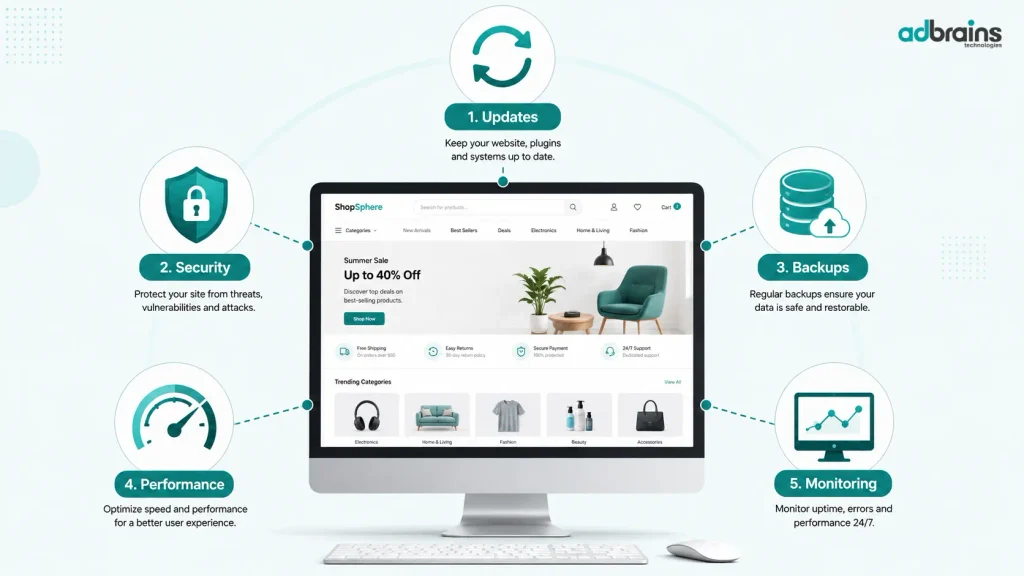
Website maintenance is more than updating a few plugins once in a while. It involves keeping the technical parts of your website working properly and checking for problems before they affect visitors.
Depending on the website, ongoing maintenance can include:
- Software, CMS, theme and plugin updates
- Security checks and vulnerability monitoring
- Regular backups and recovery testing
- Broken link and form checks
- Performance monitoring
- Compatibility checks after updates
- Fixing technical issues
- Monitoring third-party integrations
- Small content or functionality updates
Not every website needs all of these at the same frequency. Maintenance should reflect how the website is built and how important it is to the business.
Does Every Website Need Ongoing Maintenance?
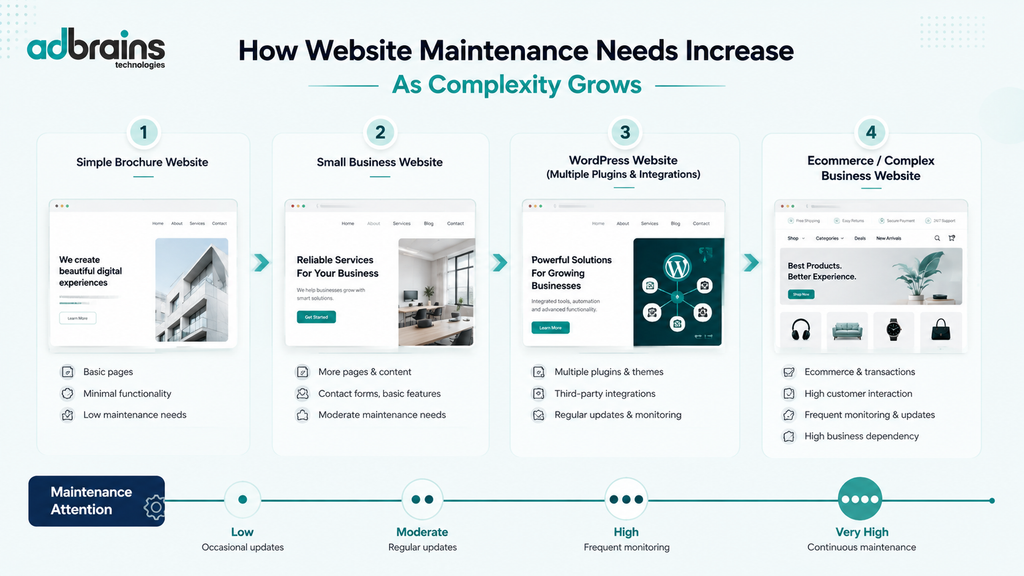
No. A website does not automatically need the same maintenance plan simply because it is online.
Consider a basic brochure website with a few pages, no customer accounts, no ecommerce and very little content change. It may only need occasional technical checks.
Now compare that with an ecommerce website that handles orders, payment integrations, customer accounts, multiple plugins and regular updates. Leaving that website unchecked for long periods creates more opportunities for something to stop working.
A useful way to think about it is:
| Website type | Maintenance need |
| Simple static website | Occasional checks |
| Small business website | Regular technical checks |
| WordPress website with multiple plugins | Regular maintenance |
| Ecommerce website | Frequent monitoring and maintenance |
| Complex or business-critical website | Ongoing technical attention |
The right level of maintenance depends on complexity, risk and how much the business relies on the website.
What Can Happen If You Never Maintain Your Website?
A website can continue to look fine while problems develop underneath it.
For example, an update to one plugin may create a compatibility issue with another. A contact form may stop sending enquiries. An old integration may no longer work correctly. A website can gradually become slower, or an outdated component can create a security risk.
There is also a less obvious problem: you may not know that something is broken until a visitor tells you.
That can be particularly costly if your website is responsible for generating leads or taking orders.
A backup is not enough on its own
Having backups is important, but you should also know whether those backups can actually be restored.
💡 Tip: Don’t wait until your website breaks to discover that your latest backup is incomplete or cannot be recovered. Periodically check that your backup and recovery process actually works.
How Often Does a Website Need Maintenance?
There is no universal answer such as “every website needs maintenance every month”.
A better approach is to consider what your website uses and how frequently it changes.
A simple website may only require occasional checks. A WordPress website with several plugins may need more regular updates and compatibility checks. An ecommerce or membership website may require much closer monitoring because technical problems can directly affect customers and revenue.
You should also consider how quickly your business needs problems resolved.
If your website is simply an online brochure, a minor issue may not be urgent.
If customers place orders through it, even a short period of downtime can become a business problem.
Can You Maintain Your Website Yourself?
Sometimes, yes.
If you have a straightforward website and are comfortable handling basic technical tasks, you may be able to manage some maintenance yourself.
That could include:
- Keeping software updated
- Checking backups
- Testing contact forms
- Reviewing broken links
- Monitoring basic performance
- Checking that important pages still work
The challenge comes when an update causes an unexpected problem.
If you know how to troubleshoot compatibility issues, restore a backup and identify the cause, self-maintenance may be practical.
If you don’t, a seemingly simple update can turn into several hours of troubleshooting.
The question is therefore not only “Can I maintain my website?”, but also:
“Do I have the time and technical knowledge to fix it when something goes wrong?”
When Does Professional Website Maintenance Make Sense?
Professional website maintenance service support becomes more useful when your website is important to your business but you don’t have the time or technical expertise to look after it properly.
It may be worth considering if your website:
- Generates regular leads
- Processes online orders
- Uses several plugins or integrations
- Has custom functionality
- Handles customer accounts or data
- Requires frequent content changes
- Is difficult to troubleshoot internally
- Would cause a significant business problem if it went offline
The benefit is not simply having someone “update the website”.
A good maintenance process should help you identify potential problems, keep the technical components working together and have a recovery plan when something does go wrong.
A Simple Test: Does Your Website Need Maintenance?
You can get a reasonable idea by asking yourself a few questions:
- When was the last successful website backup?
- Do you know how to restore that backup?
- Are your CMS, themes and plugins up to date?
- Have you tested your important forms recently?
- Do your key pages still work as expected?
- Are there broken links or outdated integrations?
- Have you checked your website’s performance recently?
- Do you know who would fix the site if it stopped working tomorrow?
If you can confidently answer all of these, your website may already have a sensible maintenance process.
If several answers are “I’m not sure”, that is a sign that your website could benefit from a technical review.
The Bottom Line: Maintenance Should Match Your Website
So, does your website really need ongoing maintenance?
Possibly, but not necessarily in the same way as every other website.
A simple website that rarely changes may only need occasional checks. A website that handles leads, sales, customer accounts or complex functionality has much more to protect.
The goal should not be to buy the biggest maintenance package available. It should be to have enough updates, backups, security checks, monitoring and technical support to match the actual needs of your website.
If your website is important to your business and you are not confident that these areas are being looked after, getting a professional assessment can be a sensible place to start.